RTILA X Version:
**OS: Windows 11
Steps to Reproduce:
-
Create a project with simple data extration and in web data extraction, write code to create CSV files in output folder.
const hashOutputPath = resolvePath(‘output’, ‘technoholic_posts_hash.csv’);
await Deno.writeTextFile(hashOutputPath , csvHashString);
-
Run the project
-
Wait for project to finish running
Expected Behavior: technoholic_posts_hash.cs to be created inside output folder
Actual Behavior: Data extracted but no file created. No error.
Error Logs: No error.
The project was working in the previous RTILA version, not working in RTILA-X
Thank you for reporting this. Could you please attach the old project file, or provide a few details about your specific project and use case?
it does not let me attach the .json file.
{
“command”: “run_script”,
“name”: “Export Data to CSV with #delemiter”,
“params”: {
“script”: “export default async function(page, variables, resolvePath) {\n const data = variables.extractedPosts;\n\n if (!data || data.length === 0) {\n console.log(‘No data found in extractedPosts variable to convert to CSV.’);\n return;\n }\n\n const headers = [‘title’, ‘news’, ‘link’, ‘image’];\n\n // ----------- Hash-delimited CSV ----------- //\n const csvRowsHash = ;\n\n // Add header row with ‘#’ delimiter\n csvRowsHash.push(headers.join(‘#’));\n\n for (const item of data) {\n const values = headers.map(header => {\n let value = String(item[header] || ‘’).trim();\n\n // Escape double quotes\n value = value.replace(/“/g, ‘”“’);\n\n // Enclose in quotes if contains delimiter or line breaks\n if (\n value.includes(‘#’) ||\n value.includes(‘\n’) ||\n value.includes(‘\r’) ||\n value.includes(‘,’)\n ) {\n value = \"${value}\";\n }\n // Replace newlines inside cell with space\n value = value.replace(/\r\n|\r|\n/g, ’ ‘);\n return value;\n });\n csvRowsHash.push(values.join(’#‘));\n }\n\n const csvHashString = csvRowsHash.join(’\n’);\n\n // ----------- Comma-delimited CSV ----------- //\n const csvRowsComma = ;\n\n // Add header row with ‘,’ delimiter\n csvRowsComma.push(headers.join(‘,’));\n\n for (const item of data) {\n const values = headers.map(header => {\n let value = String(item[header] || ‘’).trim();\n // Escape double quotes\n value = value.replace(/”/g, ‘“”’);\n\n if (\n value.includes(‘#’) ||\n value.includes(‘\n’) ||\n value.includes(‘\r’) ||\n value.includes(‘,’)\n ) {\n value = \"${value}\";\n }\n value = value.replace(/\r\n|\r|\n/g, ’ ‘);\n return value;\n });\n csvRowsComma.push(values.join(’,‘));\n }\n\n const csvCommaString = csvRowsComma.join(’\n’);\n\n const hashOutputPath = resolvePath(‘output’, ‘hackernews_posts_hash.csv’);\n const commaOutputPath = resolvePath(‘output’, ‘hackernews_posts_comma.csv’);\n\n try {\n await Deno.writeTextFile(hashOutputPath, csvHashString);\n console.log('Successfully saved hash-delimited CSV to ’ + hashOutputPath);\n } catch (error) {\n console.error('Error writing hash CSV file: ’ + error.message);\n }\n\n try {\n await Deno.writeTextFile(commaOutputPath, csvCommaString);\n console.log('Successfully saved comma-delimited CSV to ’ + commaOutputPath);\n } catch (error) {\n console.error('Error writing comma CSV file: ’ + error.message);\n }\n}”
},
“then”:
}
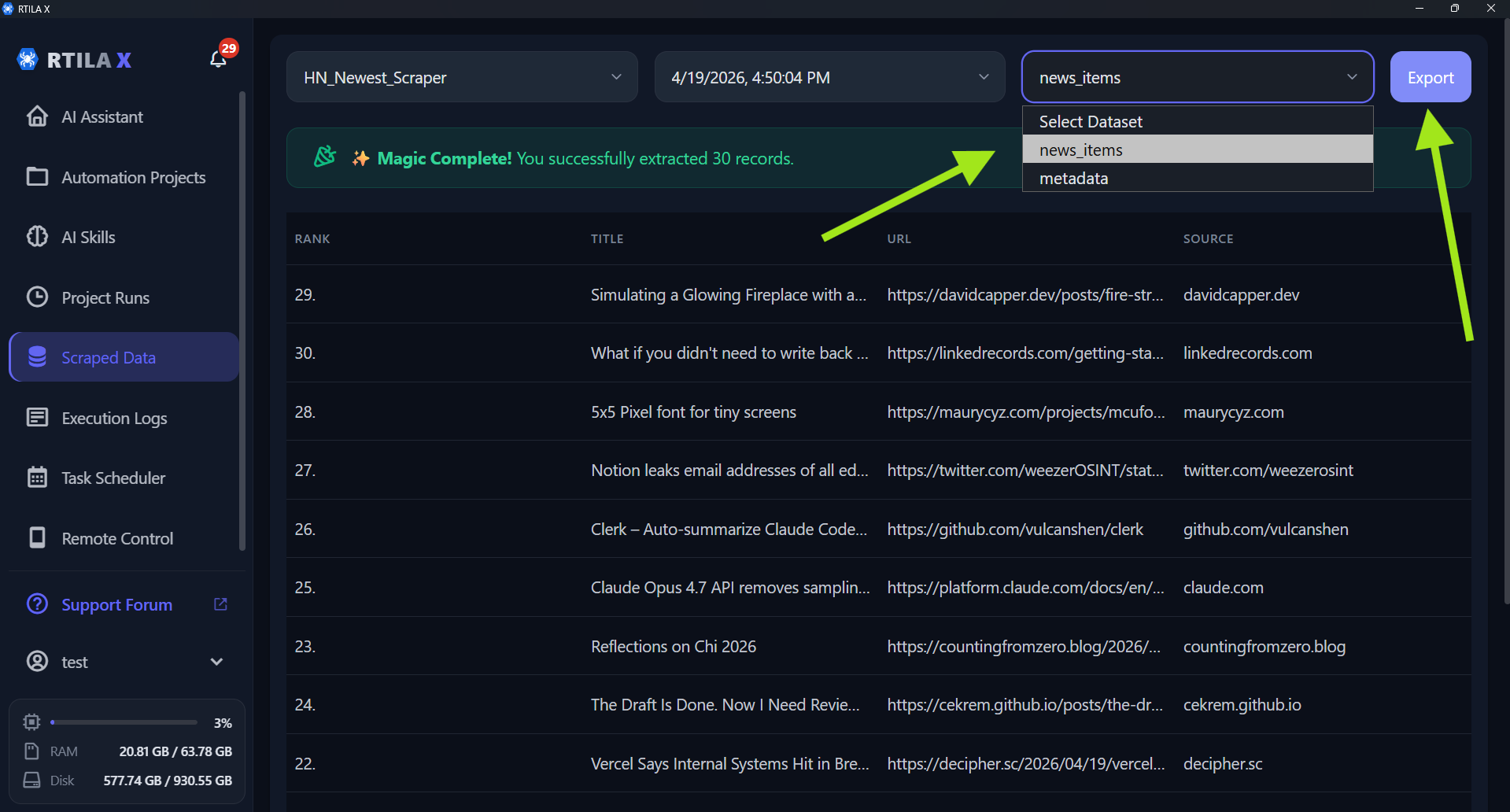
Thanks for sharing. It’s a bit hard to understand from just the pasted text (we have actually just added support for attaching .json files), but I assume you need to scrape data from Hacker News. Please check the attached video demo, project file, and screenshot to see the data extraction in action.
If this isn’t what you need, please let me know the exact data and output format you are looking for, and I will adjust the project or prompt.
HN_Newest_Scraper.json (2.3 KB)
Thanks for the video and screenshots. In the script, I have added logic to modify the delimeter with # instead of comma. This is my specific requirement. I tried to upload the json here, but it says new users are not allowed to upload files.
This is what I am doing.
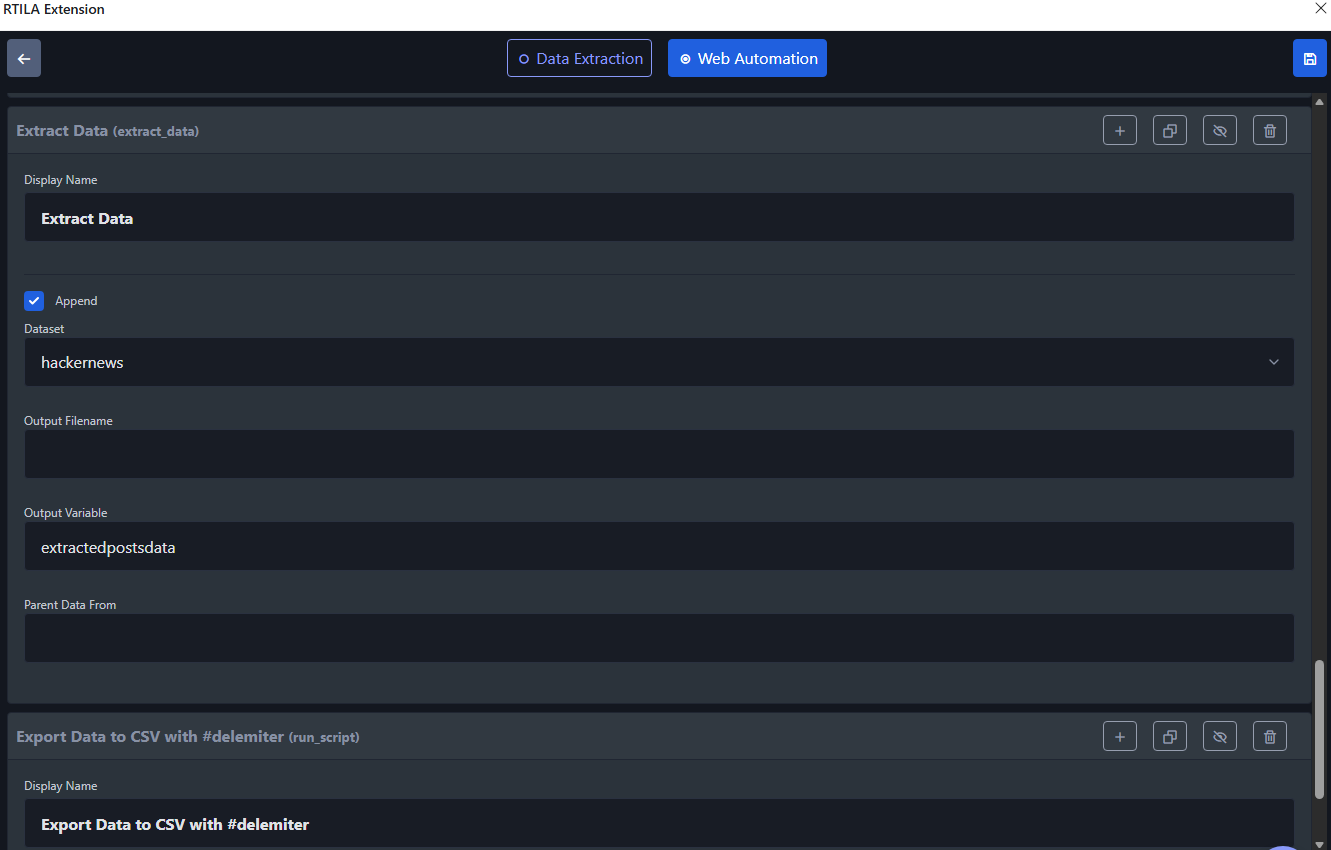
In the web Automation, I am using extract_data to set the data in output variable called “extractedpostsdata”
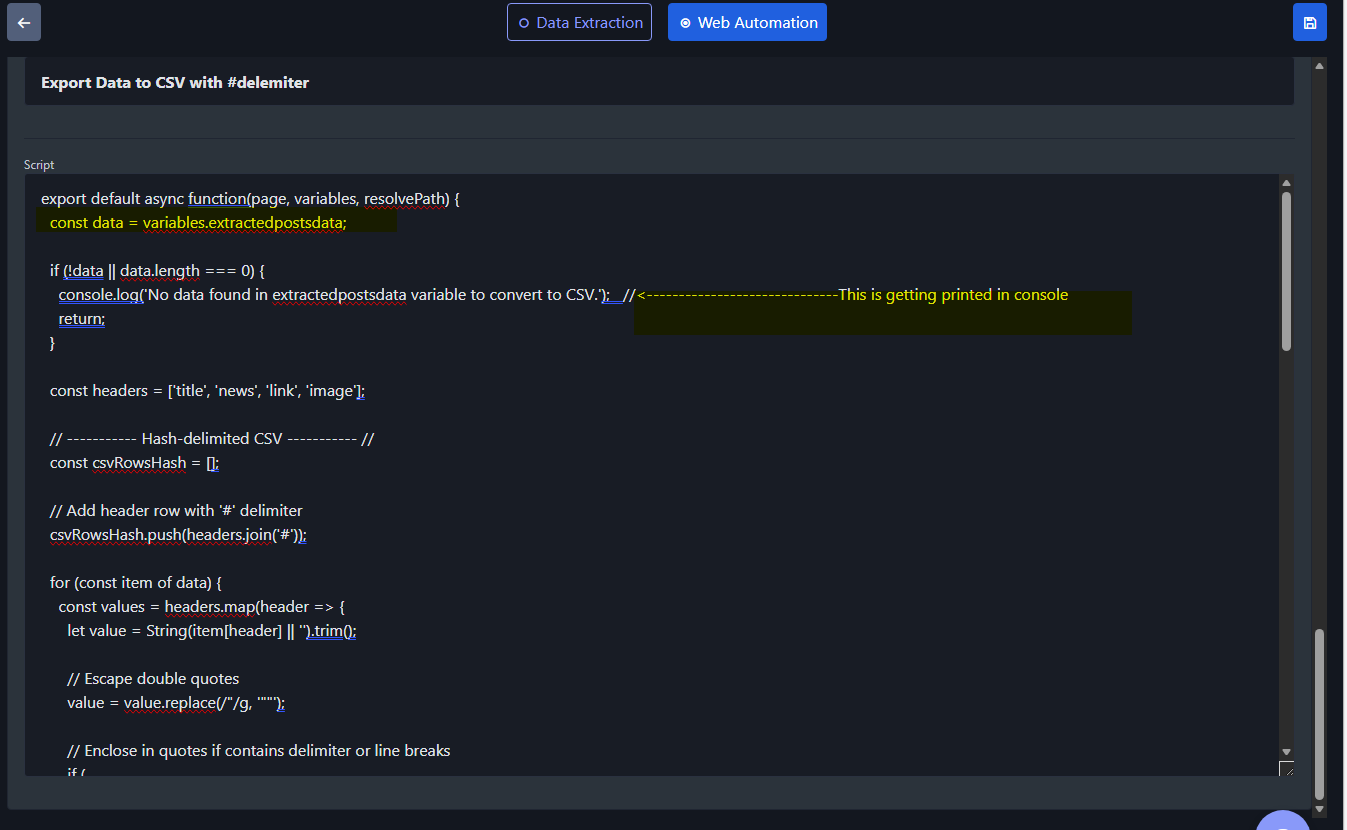
In the next command, I am using script to access the data from variable using
const data = variables.extractedpostsdata;
But here, it is not finding data though the dataset “hackernews” has data.
Thank you.
Was not able to upload in the previous post as it was allowing only 1 image.
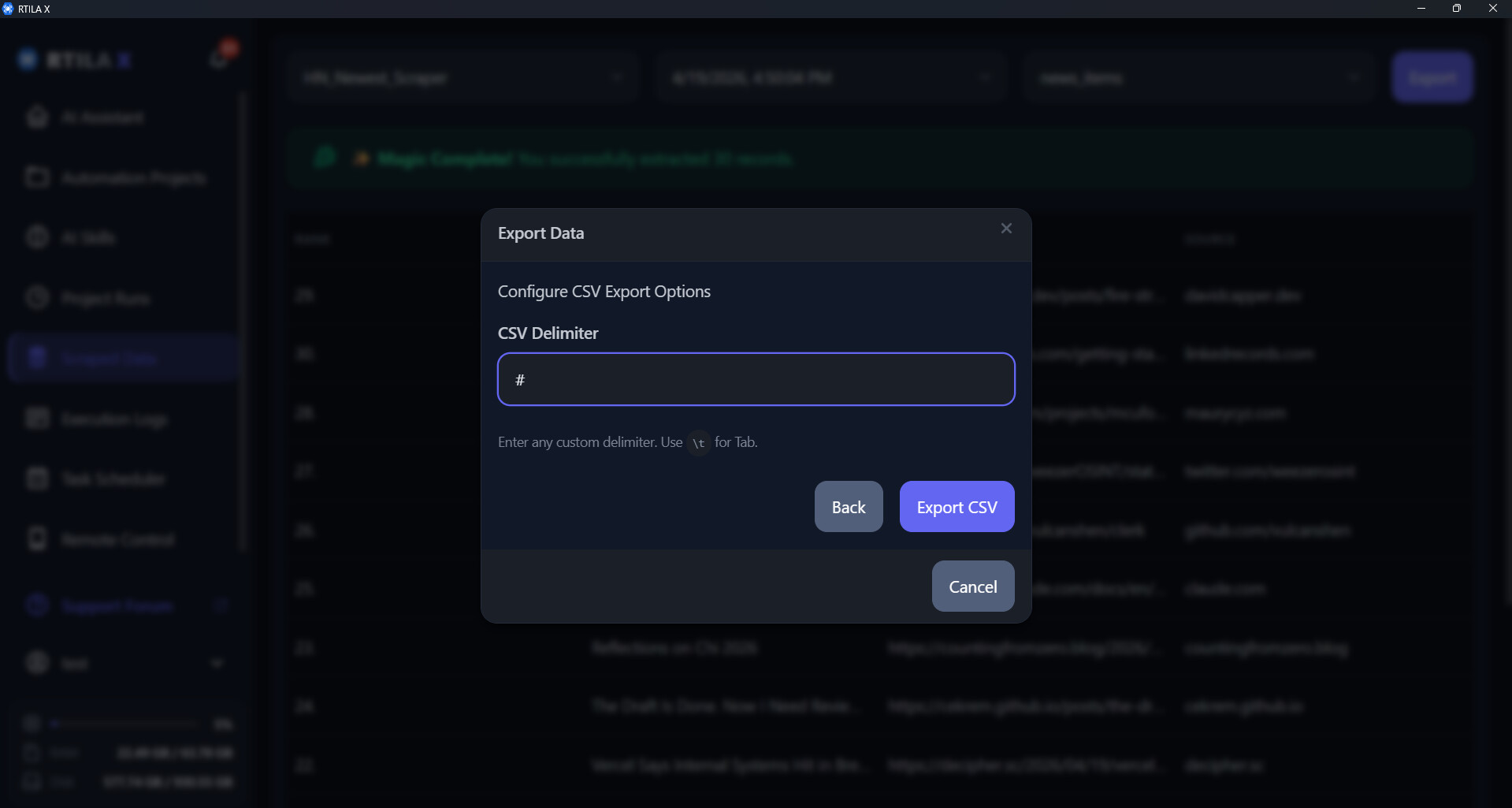
What you are trying to do shouldn’t be difficult to achieve, and you shouldn’t have to use custom code for it. A feature like this should be available by default, which is why I added a quick patch to support it. The patch is available here (screenshot below) : https://github.com/rtila-corporation/rtila-releases/releases/download/v8.2.0/RTILA_8.2.221_x64-setup.exe
Please note that while using code can help you achieve almost anything you need, our goal is to make things easy. We want to reserve custom code only for advanced manipulations that we can’t support via our UI.
Please check the new export and let me know if it meets your needs. Otherwise, let’s keep digging to see if you require further custom UI changes or if we need to switch to an advanced code mode.
do you have a step-by-step video explaining how things work with RTILA “X”? with audio…
At the moment we are finishing up stabilizing the Windows version and preparing to publish the Mac and Linux versions in the next few days. As soon as these updates are released, producing training materials will be our main focus